
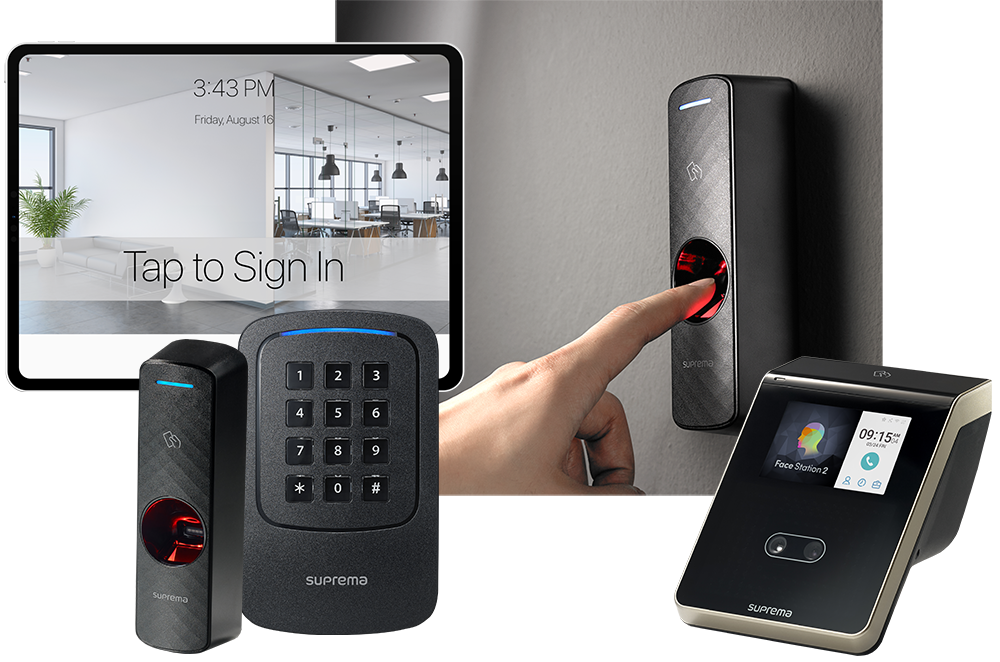
Integrating access control with emergency response plans lets you control movement, secure critical areas, and support safe evacuation the moment an incident begins. You should map door actions to scenarios like fire, medical, or lockdown events, assign role-based override authority, and automate alerts through connected alarms and messaging systems. Real-time access data shows who’s inside and where they are, helping you coordinate faster, verify actions, and test procedures so your response stays reliable under pressure.
How Access Control Strengthens Emergency Response
Access control is the backbone of an effective emergency response plan because it tells you, in real time, who can enter, who must stay out, and where people are located during a crisis. It gives you immediate visibility, faster accountability, and tighter command over restricted areas.
You strengthen incident management when security technology verifies identities, logs movement, and supports rapid decisions. Your risk assessment becomes more accurate because access data shows vulnerabilities, occupancy, and exceptions. Strong communication strategies depend on reliable status information, while training programs guarantee your team follows procedures without hesitation. Through system integration, you connect alarms, video, and credentials for one operational picture. You must also protect data privacy, limiting access to sensitive records. Finally, stakeholder collaboration keeps security, operations, and leadership aligned, so your response stays controlled, coordinated, and effective.
Map Access Control to Emergency Scenarios
You need to match each emergency scenario to specific access control actions before an incident occurs. Define emergency access protocols so authorized personnel can enter critical areas fast while all other access stays restricted. Then map response roles to permissions, so each team can move where it’s needed without creating confusion or risk.
Emergency Access Protocols
When an alarm is triggered, your access control system must shift from routine permissions to scenario-based rules that support life safety first. You should predefine emergency access permissions for fire, medical, lockdown, and severe weather events. Open exit routes immediately, secure restricted hazards, and enable responder entry points without delay. Your procedures must specify who can override doors, when overrides expire, and how events are logged.
You also need fail-safe and fail-secure settings matched to each opening’s risk. Test backup power, communication paths, and remote command functions regularly. During emergency drills, verify that doors behave exactly as planned and that occupants can move safely. After every activation, review system logs, confirm hardware performance, and correct gaps fast. Clear protocols reduce confusion, support evacuation, and protect people under pressure.
Role-Based Response Mapping
Because every emergency demands different movement and control, role-based response mapping must assign door behavior and override authority by scenario and by person. You should define who grants access, who shelters, who escorts, and who can change permissions under fire, medical, intrusion, or hazardous material conditions. Build a clear response hierarchy so operators know exactly when to grant free egress, lock down zones, or open protected routes for responders.
You must also design for role flexibility. If a supervisor is absent, your plan should let trained alternates assume the same access rights without delay. Tie credentials to incident types, approved actions, and time limits. Then test each mapping through drills, system simulations, and after-action reviews. If access behavior doesn’t match operational reality, revise it immediately before it creates confusion or dangerous delay.
Assign Access Roles and Response Triggers
Before an incident tests the plan, assign access by role, not by individual preference, so only authorized staff can enter restricted areas, view sensitive systems, or approve critical actions. Define role assignment in writing, tie each role to specific spaces, credentials, and decision rights, and verify coverage for every shift.
Next, identify the trigger mechanisms that change response posture. You should specify what events require elevated access, temporary denial, supervisor approval, or emergency override. Use objective criteria: alarm type, threat location, injury status, or utility failure. Document who can activate each trigger, who confirms it, and how long permissions remain valid. Review exceptions, contractors, and mutual-aid partners in advance. Then test your matrix against realistic scenarios, correct conflicts immediately, and train staff until every action is consistent, fast, and accountable.
Automate Lockdowns, Unlocks, and Alerts
Although staff can initiate emergency actions manually, you shouldn’t rely on human speed alone to secure a facility under stress. You need predefined rules that trigger lockdowns, selective openings, and automated notifications the moment an approved alarm condition occurs. That structure improves lockdown efficiency, reduces hesitation, and keeps people moving according to plan.
Configure system integration between access control, fire panels, intrusion alarms, PA systems, and mass messaging tools. You should map which doors fail secure, which open for evacuation, and who receives alerts first. Test those sequences during emergency drills so response coordination becomes consistent, not improvised. After each event or exercise, run an access audit to confirm commands executed correctly, timestamps aligned, and exceptions were documented. Automation doesn’t replace judgment; it enforces your procedures immediately and reliably.
Use Real-Time Access Data During Incidents
Automated actions secure the building fast, but real-time access data tells you what’s actually happening after those commands go out. You need immediate visibility into badge reads, forced doors, held-open alarms, and denied entries. That live stream confirms whether people are moving toward safe areas, entering restricted zones, or bypassing controls during the event.
Use dashboards with real-time analytics to track occupancy by zone, identify last-known locations, and verify which doors changed state. Prioritize incident monitoring for high-risk entries, stairwells, server rooms, and perimeter exits. If a door opens unexpectedly or credentials appear in the wrong area, escalate at once. Share verified access data with security, facilities, and first responders so decisions stay aligned with actual conditions. Accurate status lets you direct evacuations, isolate threats, and protect occupants.
Test Your Access Control Response Plan
How do you know your access control response plan will work under pressure? You test it before an emergency exposes gaps. Run scheduled drills that mirror lockdowns, evacuations, credential failures, and forced-entry attempts. Verify door behavior, alarm triggers, camera links, and command authority. Document every step, time each action, and confirm backups activate correctly.
After each drill, review logs, video, and staff decisions. Use system audits to catch permission errors, stale credentials, hardware faults, and communication delays. Tighten procedures where response times slip or accountability breaks down. Reinforce user training so employees know exactly when to badge, override, shelter, or escalate. Repeat tests with different scenarios, shifts, and team leads. A tested plan gives you confidence, reduces confusion, and protects people, property, and operations when seconds matter most during real incidents.
Frequently Asked Questions
How Much Does Emergency-Integrated Access Control Typically Cost?
You’ll typically pay $5,000 to $50,000+ for emergency-integrated access control, depending on your facility size and complexity. You should budget for hardware, software, installation, monitoring, and training. Key cost factors include door count, credential type, integration requirements, and compliance needs. Advanced system features like lockdown automation, remote management, and real-time alerts raise pricing. You’ll get better safety performance when you match capabilities to risks and operational procedures.
Can Legacy Access Control Systems Support Emergency Response Integration?
Yes, you can often make legacy systems support emergency protocols, but only after you verify compatibility—coincidentally, that’s where most failures start. You’ll need to assess hardware limits, software interfaces, and response timing first. If integration challenges appear, don’t force unsafe workarounds; require controlled system upgrades instead. You should test alarms, lockdowns, and override functions under real scenarios, then document every result so you’re certain the system performs reliably.
What Employee Training Is Required for Emergency Access Procedures?
You need training that covers emergency drills, badge or credential use during lockdowns and evacuations, manual override steps, communication protocols, and clear role assignments. You must practice who releases, who secures, who accounts for staff, and who contacts responders. You should rehearse fail-safe and fail-secure scenarios, verify muster procedures, and document competency. If you can’t perform each step quickly and correctly under pressure, your training isn’t sufficient yet.
How Often Should Access Control Hardware Be Inspected or Replaced?
You should inspect access control hardware monthly, test critical components quarterly, and perform a full system review annually. You’ll replace devices according to hardware lifespan, manufacturer guidance, failure rates, and site conditions, typically every five to ten years. Follow strict maintenance schedules, document every inspection, and act immediately on wear, corrosion, battery weakness, or communication faults. Don’t delay replacement if reliability drops, because compromised hardware creates unacceptable safety and security risks.
Are There Legal Liabilities When Access Control Fails During Emergencies?
Yes, you can face legal liabilities when access control fails during emergencies. You must conduct a liability assessment, verify emergency protocols, and document risk mitigation steps. Courts and regulators will examine whether you maintained systems, trained staff, and followed legal considerations tied to safety codes and the duty of care. If failures block evacuation or delay responders, you could face fines, lawsuits, or negligence claims. Act fast: inspect, correct, document everything.